
Updated
Quick Summary
To read a home inspection report in Texas, review the inspection limits, understand the TREC markings, and read every finding with its photographs and recommended next step. Use the summary as a guide to the complete report. Prioritize safety concerns, ongoing damage, specialist evaluations, and anything that could not be tested.
I use HomeGauge inspection reports to help clients in Corpus Christi and the Coastal Bend understand observed conditions and plan appropriate follow-up.
Start With the Property Details and Inspection Limits
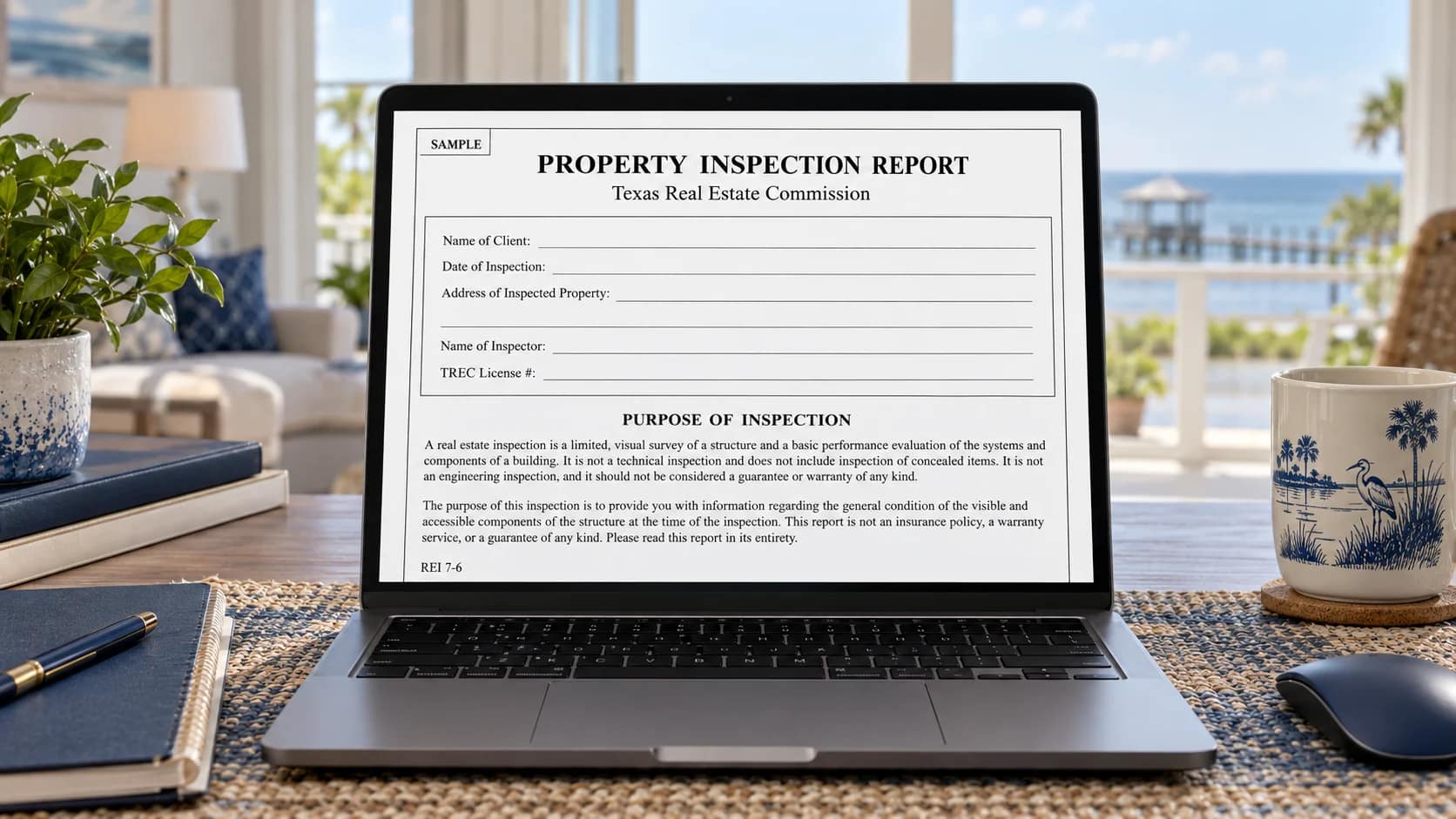
Confirm the property address, inspection date, inspector’s name, and license number. Then read the introductory pages and any descriptions of conditions that affected access or testing.
A furnished home, a locked attic, stored belongings, or disconnected utilities can affect what can be evaluated. A report describes conditions observed on the inspection date; it does not guarantee future performance or reveal everything behind walls and finishes.
Before comparing two reports, compare their scope and access limitations. A shorter report does not necessarily indicate a home with fewer concerns.
Where to Find These Details on REI 7-6
On the first page of the blank TREC form, the identification fields are at the top. The inspection-purpose and responsibility notices follow, with Report Limitations near the bottom. Access or testing restrictions specific to your property may also appear in the relevant system comments or attachments.

Understand the Texas TREC Report Markings
The Texas Property Inspection Report uses four markings. Read the comment beside each system rather than relying on the box alone.
- I — Inspected:The inspector evaluated at least part of the system or component. This is not a warranty that every part is defect-free.
- NI — Not Inspected:Review the explanation for an access, operating, or other inspection limitation.
- NP — Not Present:The item was not present.
- D — Deficient:A reportable deficiency was identified. Read the narrative for its meaning and recommended follow-up.
More than one marking can apply to a system. For example, a component can be inspected and also have a deficiency. The TREC Property Inspection Report form explains the report’s purpose and limitations.
Where the I, NI, NP and D Boxes Appear
The legend and four checkbox columns appear at the top of the system pages. In the blank form, page 3 begins the structural systems section. The boxes sit to the left of each item, and the related comments appear beneath it. Completed reports may have different pagination as comments and photographs are added.

Read Your HomeGauge Digital Report in Full
Corpus Christi Home Inspections uses HomeGauge to deliver digital reports with photographs and explanations. Open the report using your delivery email and follow the access instructions provided.
- Use the summary to get oriented.
Identify comments that need careful review, then open their full report sections. - Read each system section.
Check descriptions, inspection methods, limitations, and all associated findings. - Review photos with the comments.
Arrows and close-ups help identify a location; they may not show the full extent of a condition. - Save a copy for reference.
Use the available report or PDF options and retain the original delivery email.
Report colors and summary categories may vary with the inspector’s setup. Use the legend in your own report; do not assume a color has a universal Texas meaning. For access help, see HomeGauge’s customer dashboard guide.
Official TREC Report vs. a Web Presentation
The distinction is the report’s content and purpose, not whether you read it on paper, as a PDF, or in a web browser. An online HomeGauge report can present the required Texas inspection information; a summary or attractive dashboard alone does not replace the complete report.
The Required Texas Report
The completed TREC REI 7-6 form records the inspection details, required notices, system markings, findings, and limitations. For inspections covered by the standard reporting requirement, clients must receive the completed form first, even when the inspector also provides another report.
The Web Presentation
HomeGauge’s online delivery makes the report easier to navigate, with photographs and available document or request-list options. An overview, selected-photo presentation, or repair-request list may show only part of the information. Open the complete inspection report and read its limitations and system comments.
What should you keep? Retain the completed TREC report and any supporting documents, along with your online access information. If you can only see a summary, ask your inspector where to find the full report. A PDF is a file format; its appearance alone does not establish whether the required report is complete.
Source: TREC’s explanation of Texas property inspection requirements.
View a Sample Home Inspection Report
Want to see what a completed Texas home inspection report looks like? Explore a sample report from Corpus Christi Home Inspections to see how property conditions, inspection findings, photographs, deficiencies, and professional recommendations are documented and organized.
The sample provides a practical example of how a HomeGauge inspection report presents information about the property’s observable condition. It also demonstrates how photographs and written explanations help buyers understand identified deficiencies and determine appropriate next steps.
What to Look for in the Sample Report
- Inspection Summary: Review the listed findings, then open the corresponding sections for complete details.
- System Sections: See how roofing, structural components, electrical, plumbing, HVAC, and other inspected systems are organized.
- Inspection Photographs: View examples of how visible conditions and deficiencies are documented.
- Recommendations: Review the explanations and suggested follow-up evaluations or corrective actions.

Illustrative sample property for educational purposes only. Inspection findings, report length, and recommendations vary depending on the property and conditions observed during the inspection.
For more information about digital report delivery, inspection photographs, and what is included in your report, visit our Your Home Inspection Report page.
Separate the Finding, Significance, and Recommendation
A useful way to read any inspection comment is to ask three questions: What was observed? Why does it matter? What should happen next?
Actual Inspection Example: Window Perimeter Sealant Gaps

Original Inspection Finding
Missing or incomplete caulking was observed around the perimeter of one or more windows on the front exterior of the home, including corners and joints. These openings may allow moisture intrusion behind the exterior wall covering, potentially contributing to concealed moisture damage and deterioration of underlying materials. Recommend evaluation and proper sealing of the affected areas by a qualified contractor using an appropriate exterior-grade sealant to help maintain a weather-resistant seal.
How to Read This Finding
Finding
Missing or incomplete caulking was observed around the perimeter of one or more front exterior windows, including corners and joints.
Significance
The opening may allow water behind the exterior covering. The visible gap alone does not establish concealed damage.
Recommended Next Step
Have a qualified contractor evaluate and properly seal the affected areas using an appropriate exterior-grade sealant system, while maintaining intended drainage paths.
This original inspection photo documents the visible window-perimeter condition. A visual inspection does not establish the extent of concealed moisture damage. For original local examples, see brick veneer inspection findings in Corpus Christi homes.
For other photographed examples, review roof inspection findings in Corpus Christi homes or findings from final new-construction inspections. Read each example’s observed condition and recommended follow-up together.
Prioritize Follow-Up by Consequence, Not the Number of Comments
A long report can contain a mixture of safety concerns, repair recommendations, maintenance, and information. Counting deficiencies is a poor way to compare homes. One condition may deserve more attention than several minor repairs.
Safety Concerns
Ask what precautions or professional evaluation are appropriate before using affected equipment or areas.
Active Water Entry or Ongoing Damage
Clarify whether the source and extent need further investigation.
Systems Needing Specialist Evaluation
Arrange the recommended contractor visit so you understand repair options and likely costs.
Maintenance and Smaller Repairs
Build a practical plan after higher-consequence concerns are understood.
Items Not Tested
Determine what access, utility restoration, or follow-up inspection is needed.
This is a reading aid, not an official TREC severity scale. Your inspector can explain an observation; the appropriate contractor can determine the repair method, scope, and estimate.
Ask Specific Questions Before Making Decisions
Keep the report item number and photograph handy. These five questions can help you turn an inspection comment into a clear next step.
Identify the Location
Which exact component or location does this comment describe?
Understand the Evidence
Was the condition observed directly, or does the report recommend further investigation?
Check Inspection Limits
Did access or operating conditions limit the inspection?
Choose the Right Professional
Which type of contractor should evaluate it?
Plan the Follow-Up
What should be checked after a repair is completed?
Use HomeGauge’s Request List When Available
For supported online reports, HomeGauge’s Create Request List feature lets buyers select report items and assemble a separate list. Review the full report first, then discuss the selected items with your real estate agent.
Keep requests tied to identifiable findings and locations. Avoid treating the list as a substitute for contractor evaluation or a signed repair agreement. See HomeGauge’s Create Request List instructions for the available steps.
Opens HomeGauge’s public demonstration report in a new tab. This is sample content, not a Corpus Christi Home Inspections client report.
Keep Records and Clarify What Was Rechecked
Retain contractor invoices, permits when applicable, repair descriptions, and warranties. A receipt marked “repaired” may not explain what work was performed or whether related areas were evaluated.
If a follow-up inspection is arranged, confirm its scope. Rechecking selected items does not mean every original limitation has been resolved or the entire property has been inspected again.
Your report also becomes a useful maintenance reference after you move in. Keep it with your property records and revisit the maintenance recommendations.
Frequently Asked Questions
What does D mean on a Texas home inspection report?
D means Deficient. Read the accompanying comment to understand the observed condition, its significance, and the recommended next step. The marking alone does not rank the urgency or cost of a repair.
Does a Texas home inspection report give a house a pass or fail?
No. The report documents observed conditions and inspection limitations. Use it to understand the property and obtain appropriate follow-up evaluations rather than treating it as a pass-or-fail certificate.
Should I read only the HomeGauge report summary?
No. Read the complete report, including system descriptions, photos, limitations, and items not inspected. A summary helps you navigate but does not replace the full report.
Does every deficiency need immediate repair?
The next step depends on the condition. Ask your inspector to clarify safety concerns, active moisture problems, and recommended specialist evaluations. Obtain advice from the appropriate contractor for repair scope and urgency.
Can I make a repair request list from my HomeGauge report?
HomeGauge offers a Create Request List feature for supported online inspection reports. When available, it lets you select report items for discussion with your agent. A request list does not itself create an agreement that the seller will make repairs.
When will I receive my inspection report?
Corpus Christi Home Inspections delivers digital HomeGauge reports within 24 hours after the inspection. Contact Gerald Herrmann if you need help accessing or understanding your report.
About Your Inspector
Gerald Herrmann, owner of Corpus Christi Home Inspections, is a Certified Master Inspector® and Texas TREC Professional Real Estate Inspector #22839. He personally performs residential inspections in Corpus Christi, Portland, Port Aransas, Padre Island, and surrounding Coastal Bend communities.
Schedule a Home Inspection in Corpus Christi
Understand the property before making your next decision. Explore what a home inspection includes.
Home inspections start at $400, depending on home size. A typical inspection takes 2–3 hours, with your digital HomeGauge report delivered within 24 hours after the inspection.
Questions? Call (361) 548-2889.


